What players say
Word Scramble is a well-designed word puzzle that uses picture clues to guide players. The drag-and-drop controls are responsive and easy to use on any device. Each level feels like a small achievement, and the game gradually increases in difficulty without becoming frustrating. It is a good choice for improving spelling and word recognition in a relaxed setting. The family-friendly content makes it suitable for both children and adults. With no time pressure, players can think carefully and enjoy the process. The game offers solid replay value, especially for those who enjoy vocabulary challenges.
About this game
Game Introduction
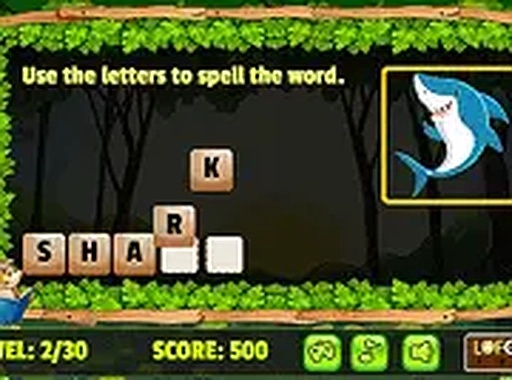
Word Scramble is an online puzzle game that challenges players to form words from scrambled letters. A picture on the left side of the screen provides a helpful clue about the word to be built. This game combines visual learning with word recognition, making it a great choice for players who enjoy brain teasers and vocabulary practice. Each level presents a new set of letters and a corresponding image, encouraging careful thinking and correct letter arrangement. The game is designed to be simple enough for children yet engaging for adults, offering a relaxing yet stimulating experience. Play directly in your browser without any downloads or installations.
How to Play
To play, start by looking at the picture on the left side of the screen. This image gives a clue about the word you need to form. Then, use your mouse or touch screen to drag and drop the letter blocks into the correct order. Arrange the letters from left to right to build the word. If you get stuck, try different combinations until you find the right one. Completing a word correctly moves you to the next level. The controls are intuitive and responsive, allowing for smooth gameplay on both desktop and mobile devices. There are no time limits or penalties, so you can play at your own pace.
Game Features
Word Scramble includes several features that enhance the experience: Picture clues help identify each word. Simple drag-and-drop controls work on mouse and touch screens. Educational content supports vocabulary and spelling skills. Family-friendly design is suitable for all ages. No downloads or installations are required for instant play. Progressive levels offer increasing challenges.
Tips for Success
To improve your performance, start by examining the picture clue carefully to guess the word before moving letters. Try common letter patterns and vowel placements. If you feel stuck, take a break and return with a fresh perspective. Practice regularly to build your vocabulary and speed. Since there are no penalties for mistakes, experiment freely with different letter orders. Focus on recognizing word roots and common prefixes or suffixes to solve puzzles more efficiently.
Compatibility
💻 Desktop | 📱 Mobile | 📟 Tablet – All supported · Best with Chrome or Safari